Jobs workflow
A kanban of real stages — check-in, inspection, approval, repair bay, completion — that the whole shop reads.
TorqueTeq runs the shop floor: repair orders, digital inspections, parts, bays and technicians on one board. Every job has a stage, an estimate and an owner.
Talk to us about pricing for your operation
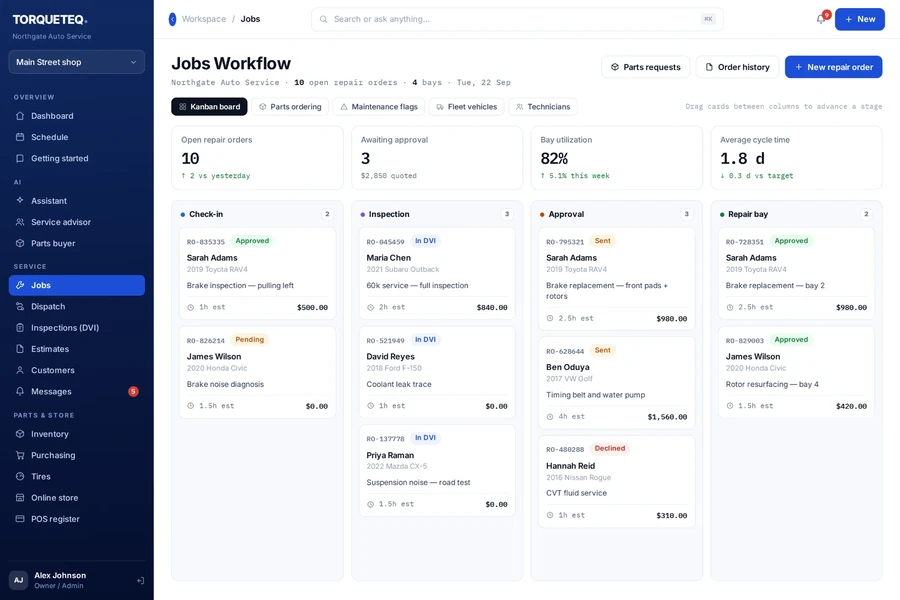
Jobs Workflow · Northgate Auto Service
The problem
A repair order starts on paper, the inspection lives on a tablet, the parts order is a phone call, the approval is a text message, and the invoice is rebuilt from memory. The customer asks for a status and nobody can answer in under five minutes.
What it does
A kanban of real stages — check-in, inspection, approval, repair bay, completion — that the whole shop reads.
DVI with photos and video attached to the order, sent to the customer for approval.
Quote by line, send it, and capture the yes or no against the job.
Requests, ordering and backorder tracking tied to the repair order that needs them.
Who is working on what, in which bay, for how long.
Multi-vehicle accounts with their own rates, approvals and billing cycles.
How it works
Step 1 of 4
Customer, vehicle and complaint captured once, attached to the order.
Step 2 of 4
Technician documents findings; the customer sees photos, not jargon.
Step 3 of 4
Line-level approval creates the authorised scope and the parts demand.
Step 4 of 4
Labour, parts and fees roll into one invoice and one payment.
Better together
Nothing here is required. Each one is there when the need is real.
Questions
Yes. Shops are separate workspaces with shared customers, and reporting rolls up across them.
The inspection and job views are built for shop-floor tablets; the counter views assume a desktop.
Purchasing supports your vendor list and order history. Specific catalogue integrations are scoped per shop.
Try it free
Tell us how your operation works and we will show you the shortest useful setup.
Also in the ecosystem